
Digital menu board software that designs your menu for you
Add your menu, choose your style, and MenuScreen arranges everything into a professional digital menu board for any TV. Scheduling, QR menus, allergens and sold-out items are included.
14-day free trial. No credit card required.
See a live demo: TV menu board · QR menu
HOW IT WORKS
From menu to screen in three simple steps
MenuScreen is built around your menu, not a blank design canvas. Add your content, choose how it should look, and put it on screen.
Add your menu
Tell us what kind of place you run and get a ready-made menu board with typical dishes in under a minute. Then change the dishes and prices to match yours.

Choose your look
Pick a template, add your logo, choose your colors and select a background that fits your restaurant.

Put it on screen
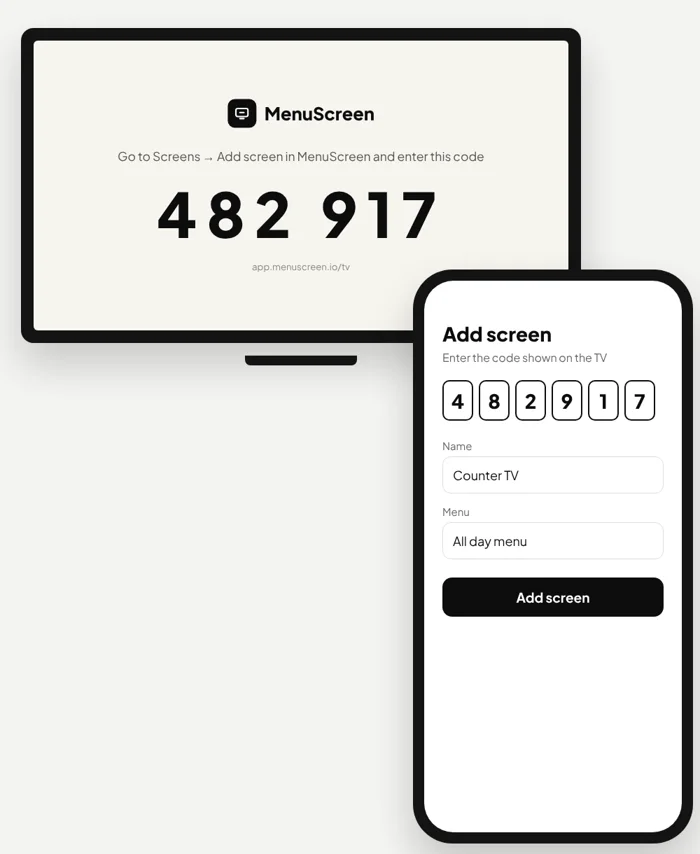
Open app.menuscreen.io/tv on any TV and type the 6-digit code it shows into MenuScreen. From then on you control the screen from your phone.
Automatic layout
You add the menu. MenuScreen handles the layout
Forget moving text boxes around every time you change a price, add a dish or reorganize your menu.
MenuScreen understands your categories, menu items, prices and available screen space, then arranges the content into a clear, professional menu board.
You stay in control of your menu. MenuScreen takes care of presenting it.
No design skills required
LARGER MENUS MADE SIMPLE
Too much for one screen? No problem.
A big menu shouldn’t mean tiny text. When your menu no longer fits on one screen, MenuScreen automatically splits it into additional pages instead of squeezing everything together.
Each page uses the same template, colors and text sizes, so your menu board stays readable from the counter and looks consistent from one page to the next.
Add a dish or a whole new category, and MenuScreen rearranges the pages for you.
DESIGN
Professional design without starting from scratch
Your menu should look like your restaurant, but creating it shouldn’t require hours in a design tool.
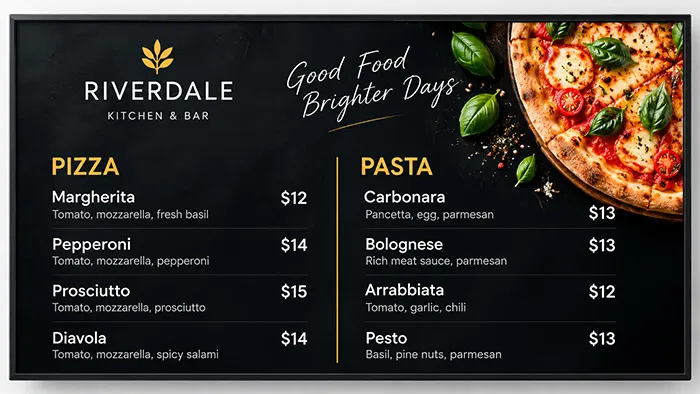
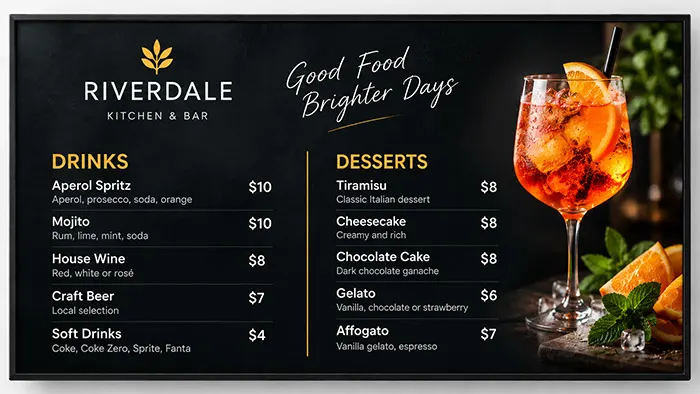
Choose a professionally designed MenuScreen template and customize it with your restaurant’s branding.

Professional templates
Choose a layout designed specifically for digital menu boards.

Your branding
Add your logo and customize colors and typography to match your
restaurant.

Restaurant backgrounds
Choose from curated food backgrounds or upload your own image.

Made for the big screen
MenuScreen layouts are designed for clear, readable 16:9 menu boards.
FOR EVERY KIND OF MENU
A digital menu board for every food business
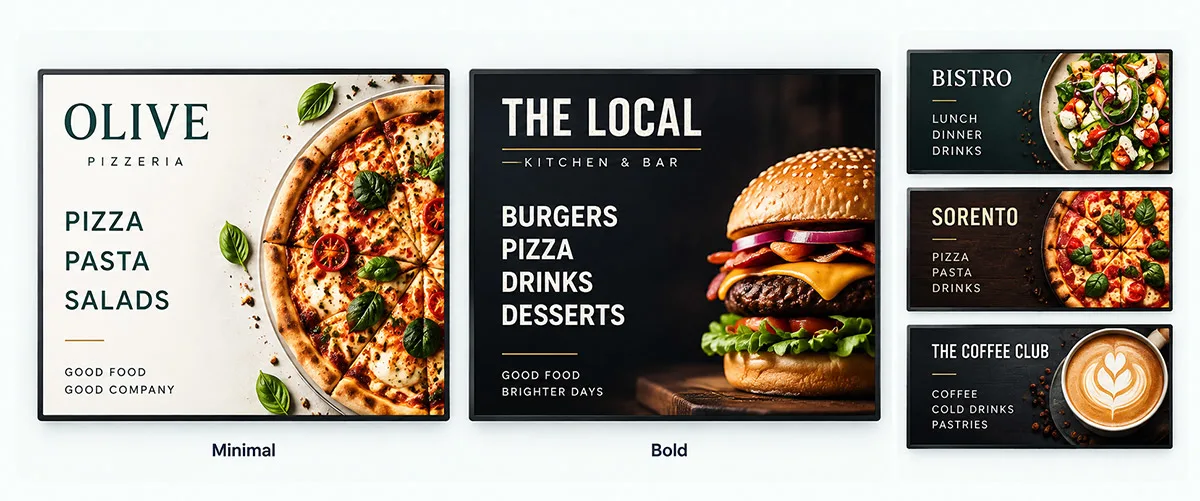
Whether you serve pizza, coffee or burgers, the challenge is the same: your menu changes more often than your signs do. MenuScreen gives restaurants, cafés and takeaways one simple way to keep every screen up to date.

Pizzerias
Show sizes, toppings and meal deals in a clear layout that customers can read while they wait in line. When prices change, update them once and your pizza menu board follows.
Coffee shops and cafés
Present drinks, sizes and add-ons next to cakes and breakfast items. Swap in seasonal specials without redesigning your whole coffee shop menu board.
Fast food and takeaway
Make burgers, combos and sides easy to scan at the counter while customers decide what to order. A clean fast food menu board helps keep the line moving.
Bakeries, bars and food trucks
From daily bakes to drink lists and street food that changes every week, MenuScreen keeps the layout tidy no matter how often your menu changes.
WORKS ON ANY SCREEN
Turn any TV into a digital menu board
Open app.menuscreen.io/tv on any TV, enter the 6-digit code it shows, and your digital menu board is live. From then on you choose what each TV shows from your phone. When you change a price or add a dish, the screen shows the update automatically.

Smart TVs
Open app.menuscreen.io/tv in your smart TV’s web browser, enter the code in MenuScreen and press OK for full screen.
Streaming sticks and mini PCs
Plug a Google TV stick or small computer into any TV with an HDMI port, open app.menuscreen.io/tv and connect it with the code.
Digital signage software
Already using a digital signage platform? Add your menu link as web content alongside your other screen content. Digital signage for restaurants.
EVERYTHING INCLUDED
Built for how restaurants really work
Menus change during the day, dishes sell out and guests ask about allergens. MenuScreen handles all of it, on every screen and at every table.

Breakfast, lunch and dinner
Schedule menus by time of day and run happy hour prices. Your screens switch automatically, right on the minute.
Sold out in one tap
Mark a dish sold out from your phone. Your screens and QR menu update within a minute, without republishing.
Allergens and dietary icons
Tag the 14 EU allergens plus vegan, vegetarian, gluten-free, halal and more. Show them on screen or only in the QR menu.
QR menu for your tables
Every published menu gets a mobile menu and a QR code. Download it as an image or a printable table card.
Promo slides
Show photos of today’s specials between your menu pages, with your own headline and text.
Offline screen alerts
Get an email if a screen has been offline for more than an hour during opening hours, so a dark screen never goes unnoticed.
Multiple locations
Manage all your restaurants from one account, with menus organized by location and their own time zone.
Your whole team
Invite managers to edit menus for their location and staff to mark items sold out. No extra cost per user.
PRICING
One simple price per screen
Every feature is included, from automatic layout and all templates to scheduling, the QR menu, multiple locations and team members. No plans to compare and no limits on menu items, pages, locations or users.
$6
per screen / month
or $60 per screen / year (2 months free)
No credit card required.
FAQ
Digital menu board questions, answered
What is a digital menu board?
A digital menu board is a restaurant menu shown on a TV or display screen instead of printed signs or chalkboards. Because the menu is digital, you can change items, prices and designs at any time without reprinting anything.
Do I need special hardware for a digital menu board?
No. MenuScreen runs in a web browser, so you can use a smart TV with a built-in browser, a regular TV with a streaming stick or small computer connected via HDMI, or a digital signage player that supports web content.
Can I use my existing TV as a menu board?
In most cases, yes. If your TV can open a web page, or you connect a device to it that can, it can display your MenuScreen menu. Landscape 16:9 screens, the standard format for TVs, work best.
How do I update prices and menu items?
Log in to MenuScreen on your phone or computer, edit the item or price and save. The layout adjusts automatically, and every connected screen shows the change within about a minute.
Do I need design skills to create a menu board?
No. Choose a template, add your logo and colors, and MenuScreen arranges your categories, items and prices into a professional layout for you.
What if my menu is too big for one screen?
MenuScreen automatically splits larger menus into multiple pages and keeps the same design on every page, so your text stays large enough to read.
Is there a digital menu board app?
Yes. MenuScreen is a web app, so there is nothing to install. You create and update your menu in your web browser, and your menu board runs in the browser on your TV, streaming stick or digital signage player.
How much does MenuScreen cost?
MenuScreen costs $6 per screen per month, or $60 per screen per year. Every feature is included, and you can try it free for 14 days without a credit card. See pricing.
Ready to put your menu on screen?
Create your first digital menu board in minutes. Try it free for 14 days, no credit card required.